Entity sharing
An entity (the person or company identified by its tax number) may be present in more than one certificate at the same time: for example, it may be a member of an SFM certificate and, at the same time, a site of a CoC certificate, possibly from different bodies. When this happens, the entity is said to be shared.
PEFC Portugal explains what entity sharing is and why it communicates shares in Announcement 3/2026 (PDF, also available in the attachments of this page).
Why sharing exists
The tax number is the unique key of each entity in the system. Ensuring that the same entity is not duplicated makes it possible to trace it across certificates and prevents the same source from being certified twice under different codes. Sharing is therefore a vigilance alert, not a block: it is perfectly legitimate for an entity to be in several certificates.
If, despite this, the same entity exists in two records, usually one of them with NIPC «FAKE…», the solution is not sharing but merging the records, done by the PEFC team: see Merging duplicate records.
"I can see an entity that is not mine"
This is the most common question. If you notice an entity that appears to be linked to another certificate, it is almost always because it is shared, and that is normal. Each user only sees their own entities; sharing merely indicates that the same entity (same tax number) is also used elsewhere.
Requesting the sharing of an entity
You need to request sharing in order to use, in one of your certificates, an entity that already exists in the system (in another certificate managed by another Holder and certification body) but to which you do not yet have access.
- Open the Partilha de entidades (Entity sharing) page.
- Indicate the certificate in which you will use it.
- Enter the tax number(s) of the entity or entities (you may enter several).
- Click Solicitar partilha (Request sharing).
You receive a notification when the request is accepted.
You can only request the sharing of an entity that already exists in the system and to which you do not yet have access. A sharing request may also arise automatically during an Excel import, when the file includes an entity that already belongs to another certificate.
The shortcut from the form
There is no need to look for the Partilha de entidades page in the menu. When creating or editing an entity in a certificate and entering a tax number that already exists in another context, the form shows the error message with a direct link to the sharing page, with the tax number already pre-filled. Simply choose the certificate in which you will use it and submit.
"Abandoned" entity: it exists in the system but is not in any certificate
There are two very different scenarios in which the system indicates that the tax number already exists, and it is useful to know how to tell them apart:
- Entity in use elsewhere. The entity is currently associated with at least one certificate (of another user or another certification body). The sharing request is the normal mechanism: you can start using it after the PEFC Administration accepts it.
- "Abandoned" entity. The entity exists in the database, but is not associated with any certificate. This happens when someone created an entity in a form and it never became part of a certificate (for example, they abandoned the form halfway through). From the outside, the error is the same: "this tax number already exists". The process is also the same (a request via the Partilha de entidades page), but what the PEFC Administration does next is different: instead of accepting a sharing request, it associates the requester with that abandoned entity.
In the PEFC Administration list, requests concerning abandoned entities are highlighted in red and have their own action, "Associar entidade" (Associate entity), instead of "Aceitar" (Accept). For these cases, the list also shows who originally created the entity, so that the request can be resolved with the appropriate context.
The flow until the entity becomes available
In summary, from the moment you “come across” the duplicate tax number until the entity is in the certificate, the path is the same in both cases; only what happens on the Administration side changes:
- The user enters the tax number in the form and sees the error message with the link to Partilha de entidades (with the NIPC already filled in).
- The user chooses the certificate in which they will use it and submits the request.
- The PEFC Administration receives the request by e-mail and sees it in the list of pending requests.
- The PEFC Administration:
- Accepts the request (normal case: the entity is already in another certificate), or
- Associates the entity with the requester (abandoned case: the entity existed but was not in use).
- The user receives the notification and the entity becomes available for use in their certificates.
"Accepted" does not mean "validated"
Sharing requests are accepted by the PEFC Administration. Accepted only means that PEFC Portugal has authorised the sharing of that entity. It does not mean that PEFC Portugal has verified or guarantees the entity's data: responsibility for the data remains with whoever maintains it.
Throughout the process, the notices follow this path:
- When sharing is requested, the PEFC Administration receives the request for analysis, and the requester receives confirmation that it has been registered.
- When it is accepted, the requester is notified that they can now use the entity, and the other parties involved in the certificates in question receive the sharing notice (in copy, without seeing each other's contact details). See Who is notified when sharing is accepted.
- When it is an abandoned entity and it is associated with the requester, the requester receives confirmation that the entity has been linked to them. As there are no other parties (nobody was using it), there are no third parties to notify. The cycle ends there.
Who is notified when sharing is accepted
When the PEFC Administration clicks Aceitar (Accept) on a sharing request (Entidades partilhadas (Shared entities) menu), a single e-mail is sent:
- Recipient: the person who requested the sharing, a user of a certification body or of a Holder. This is also the only person who receives the notification in the Forest HUB bell.
- In blind copy, for each certificate in which the entity appears (as a member of an SFM certificate, a site of a CoC certificate, the Holder or the certification body), and not only for the certificate for which sharing was requested:
- the active users of that certificate's Holder;
- from that certificate's certification body, the manager assigned to the certificate; if no manager is assigned, or the manager is inactive or belongs to another body, all active users of the body.
- Also in blind copy: the fixed addresses entered in the BCC field of the
entity-share-broadcaste-mail template (Templates de e-mail (E-mail templates) menu). This is where a fixed recipient is added or removed.
Each address receives the e-mail only once, even if it appears in several certificates. As a result, an entity with sites in several certificates notifies the certification bodies of all of them.
Unlike the notices for data changes, any certificate linked to the entity counts here, whatever its status (valid, suspended, expired, withdrawn or terminated), as do member or site links that already have an exit date. Only inactive users are left out.
The text of the e-mail comes from the same template. If the template does not exist, or sending fails, no e-mail is sent; only a warning is left in the system log.
What changes when an entity is shared
- The data is shared. Everyone sharing the entity sees and maintains the same identification data (name, tax number, address, contacts).
- Changes propagate and trigger notices. When the data of a shared entity is changed, the change is reflected in all the certificates in which it is used, and the certification bodies involved are notified, with the before and after. Everyone who shares knows that they share and sees who changed what.
The identification data of an entity is unique and shared by all the certificates and certification bodies associated with that entity:
| Field | Includes |
|---|---|
| Identification | NIF, name, alternative name, type of legal person and form of representation of the company |
| Legal representative | Name, position and title |
| Economic activity | CAE |
| Public contact details of the entity | Institutional telephone, e-mail and website |
| Addresses | Registered address and any other recorded addresses, with country, district, municipality and parish |
| Contact persons | Full list of contacts associated with the entity |
| Notes | Observations recorded about the entity |
Who is notified when the data is changed
At the moment the change is saved:
- Not all certificates linked to the entity count. Only the certification bodies of valid certificates in which the entity is still active (with no exit date) are notified. Expired or terminated certificates, and links that have already ended, are left out of the notices; the change is still recorded in the activity history.
- For each certificate covered, the notice goes to the responsible manager of that certificate at the body; if no manager is assigned, it goes to the whole body.
- The PEFC Administration always receives a copy of the notice.
- The entity of a Certification Body does not count as shared by the certificates that that body certifies: changing the data of a CB's entity does not generate notices for its portfolio of certificates.
- Holder users never receive these notices, even when they are the ones making the change; a CB or the Administration making the change receives it like any other recipient. It is therefore normal to change an entity and not see any notification on your side: it went to those who need to review it.
The notice always indicates what changed (the before and after) and who changed it. It works in the same way as for shared contacts, where the scenario table is.
Overlaps in SFM certificates
When the same entity is involved in different SFM certificates, it is the obligation of the Holders/managers of the certificates involved to ensure that the same properties are not certified in more than one certificate.
For this reason, the Holder notified about an entity that is already registered, and that is shared with other Holder(s), must send them the coordinates of the centroid(s) of the property or properties that they intend to add, so that any overlaps can be checked. To see the certificates in which the shared entity is involved, consult the list of entities in Forest HUB.
How to recognise a shared entity
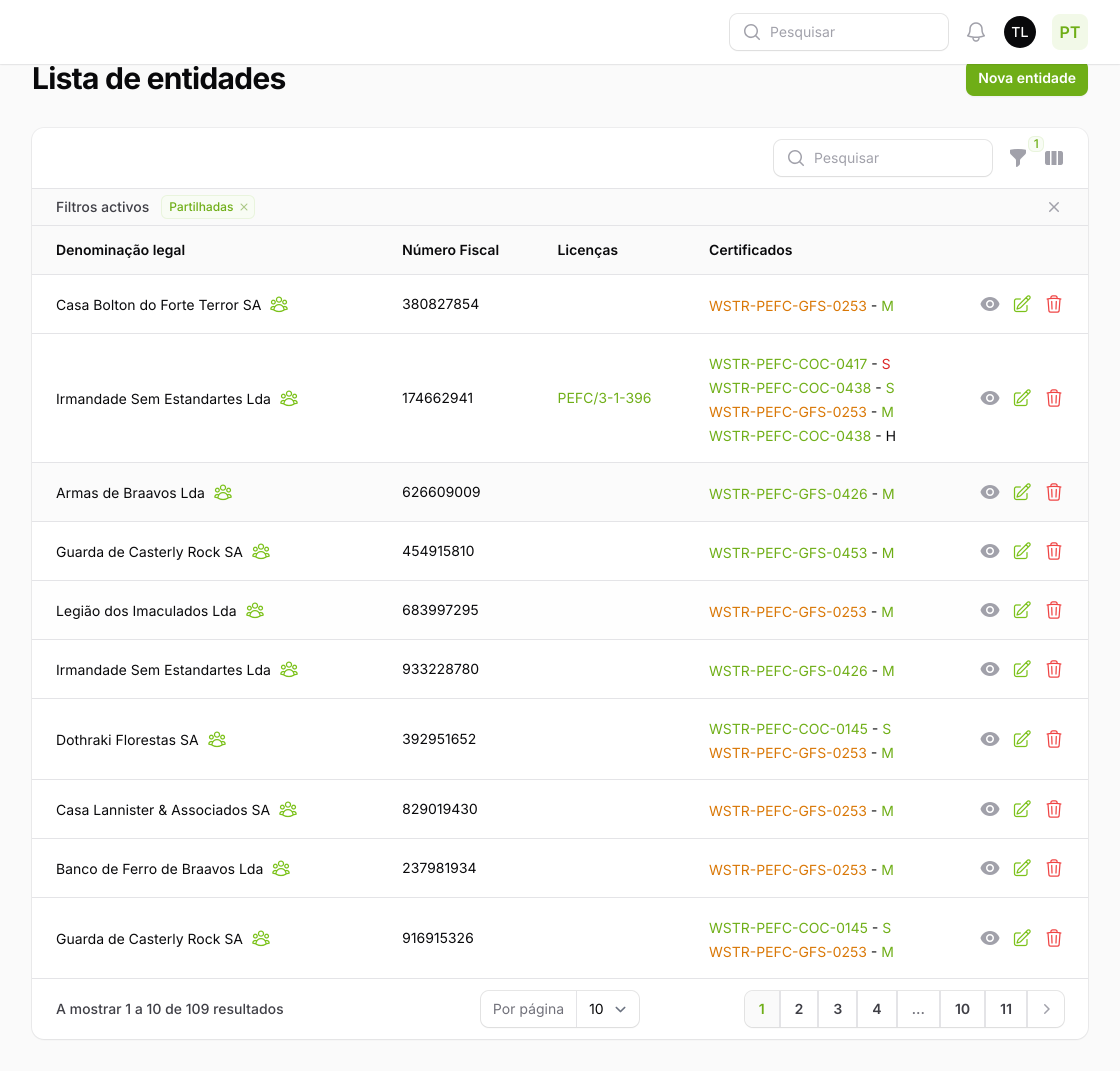
In the Entidades (Entities) list there are two ways to identify them:
- The Partilhadas (Shared) filter. Shows only the entities that are shared, whether the request has already been accepted or is still pending.
- The marker next to the name. When sharing has been accepted, the entity displays, next to its name, a group of people icon (with the indication Entidade partilhada (Shared entity) on hover). An entity whose sharing has not yet been accepted appears in the filter, but without this icon yet.
With the Partilhadas filter active, the list shows only those entities, each with the marker next to its name:
Privacy
Notifications warn that an entity is shared, but do not expose the contact details (e-mails and telephone numbers) of the other parties: each recipient receives their own message, without seeing the others' addresses. The certificate number the notice refers to, and the respective body, are public information and appear in the notice. Each user continues to see only their own entities.
Entity sharing helps Forest HUB bring robustness to PEFC certification and fulfil the responsibilities of managers and participants defined in Annex B of NP4406.